
Unifrog
Unifrog started as a university course search and comparison tool, but has grown into a powerful careers education platform!
All students from Year 7 onwards will use Unifrog to research, log, and start their Careers journey! We would encourage all Parent or Carers to support your child in accessing our Careers platform of Unifrog at home, as well as tasks set in school, as it provides tools to both research and prepare for a variety of career pathways.
Key Benefits of Unifrog:
- Centralised Career Guidance – Unifrog provides a library of resources to explore, including universities, apprenticeships, and vocational training
- Personalised Support – Unifrog allows students to take personalised quizzes and psychometric tests to discover career pathways that align to their interests. This data is then used to help signpost students to relevant resources within the Careers library.
- Application Support – Unifrog provides tools for drafting CVs, personal statements, and other application materials using the information stored regarding your child’s prior work experience, volunteering, and course choices.
- And more! Unifrog is constantly updated with new features and resources to help young people prepare for their future!
*Unifrog is also presently updating its capacities so that Parents or Carers will soon have the option to create their own login so that they can see what their student has saved, help them research career pathways, and have an overview of their Career journey up to now. Once this is available, Parent's will be sent a letter with instructions on how to access their Unifrog accounts and link their student's information to their Parent profile.
How to Log In to unifrog
If you are struggling to log into Unifrog, please find these details below to assist you:
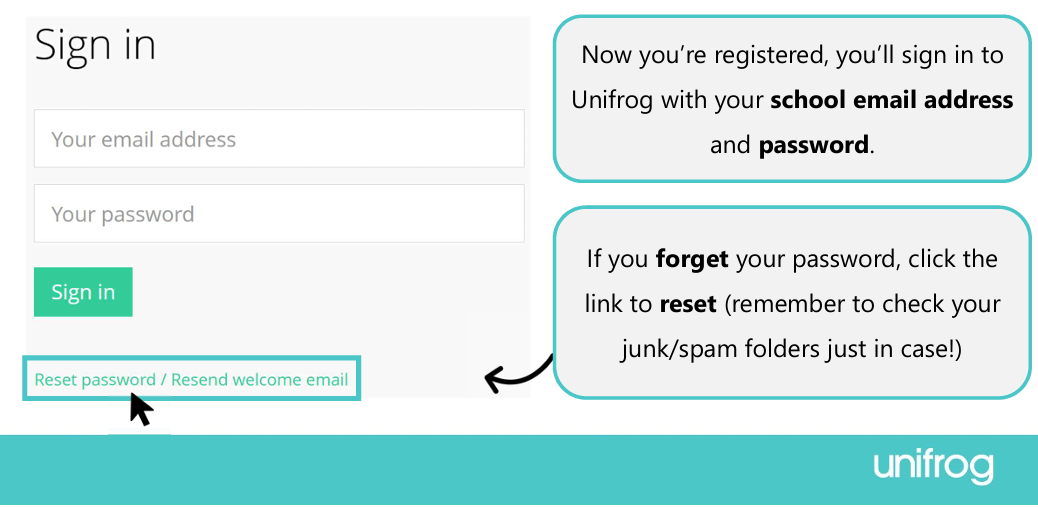
- Go to: Sign In - Unifrog
- Put your school email address in and your password
- If you have forgotten your password, please follow these steps:
- Click “Reset password/Resend welcome email”
- Enter your school email address
- Hit “Send now”
- Go to your school email account and follow the instructions that Unifrog send to you to reset your password
How to log a work experience placement on unifrog
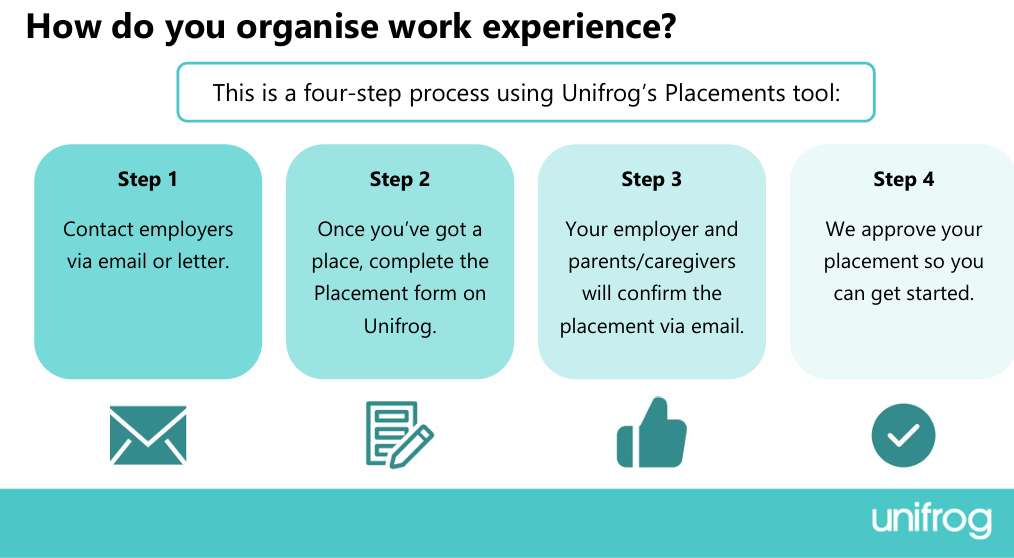
Once you have an employer who is willing to sponsor your placement, please login to Unifrog and to "Placements" tool under the 'Recording' section of tools on your homepage.
Once you are in the "Placements" tool, please watch this video for any questions that you have about the specific information you need to complete when logging a placement: cdn.unifrog.org/video/g6k0b9a2zb/720.mp4
How to write a CV on unifrog
Unifrog offer a great tool to help you construct a CV by asking you questions and giving examples of key skills and achievements you should include about yourself.
Remember a CV is a living document that evolves as you do, so keep coming back to it to add your new skills and experiences.
Steps:
- Log into Unifrog and find the CV / Resumé tool in the ‘Materials’ section. Open the tool by selecting ‘Start’.
- The CV / Resumé tool is split into several sections. You don’t have to complete all the sections, though we recommend that you do! The 3 most important sections will be the your Contact Details, Education, and Work Experience.
- Top Tip for Contact Details - always include an email and a phone number in case one method does not get through
- Top Tip for Work Experience - always include contact details for the company you completed work experience with, and details about what skills or tasks you engaged with
- When listing education or work experience, always include a "why this" sentence and explain why the experience was relevant or what skills it specifically provided to you.
Once you are in the "CV / Resume" tool, please watch this video for any questions that you have about the specific information you need to complete: cdn.unifrog.org/video/t3d0hfu4x4/720.mp4
After you have completed your CV, at the very bottom of the start page, there’s an option to download a copy of your CV as a PDF by selecting "Push to Locker" and a PDF will appear in your Locker seciton of your Unifrog.
Exploring Libraries on Unifrog
Unifrog has many libraries that students can search by using key words related to their interests, skills, or careers. After selecting a topic to read more about Unifrog will supply the local employment, education, and workforce data for your geographic area.
Simply login to Unifrog (Sign In - Unifrog) and scroll down to the "Exploring" section on your Home page. Select a library of interest and begin searching key words:

